Ninja Transfers
- 4.6
- Rating
- 10.00K
- Installs
- Free
- Price

 Analysis by App-foxy
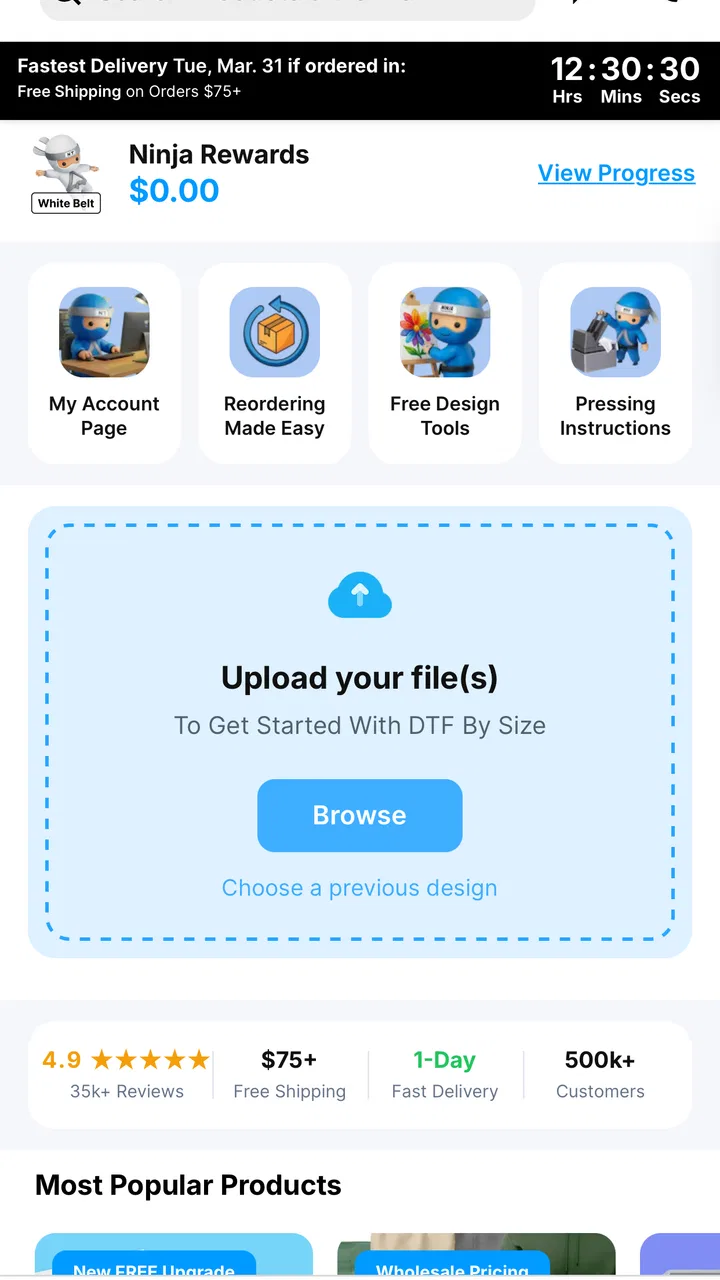
Buying custom-transfer supplies from a phone can be convenient, but convenience only matters if the shopping process remains understandable and manageable. I spent time looking at Ninja Transfers as a shopping app from that point of view: how easily I could find what I needed, how much effort the interface demanded, and whether the experience made sense in different everyday situations. My overall impression is positive, especially for people who want a focused way to browse DTF prints and blanks rather than search through a broad marketplace.
Ninja Transfers is a free shopping app from Ninja Transfers, aimed at customers looking for full-color DTF prints and blank products. It is available to an Everyone audience, which makes the intended customer base broad, although an age label alone does not guarantee that every part of an interface will work equally well for every person. The app was released on July 30, 2025, and version 1.15.0 is the version I reviewed.
How the shopping experience reads and moves
The strongest part of the concept is its narrow purpose. Instead of placing transfers beside unrelated household goods, clothing, electronics, and advertisements, the app keeps attention on products connected with apparel decoration. That focus can reduce the mental work involved in shopping, particularly when I already know that I need a transfer or a blank and do not want to sort through an enormous general marketplace.
You May Also Like

 AccuWeather: Weather Radar
AccuWeather Review: A Quick, Clear Forecast for Everyday Decisions
For everyday plans, the best forecast is the one you can understand quickly. AccuWeather makes rain timing, radar, and local conditions easy to act on, with a few trade-offs.

 Hill Climb Racing
Why Hill Climb Racing Still Turns Crashes Into One More Run
A tiny car, a bumpy hill and one more upgrade: Hill Climb Racing keeps resurfacing because its simple chaos makes every near-miss feel personal.

 AliExpress - Shopping App
AliExpress Makes Global Shopping Feel Personal, but Shoppers Bear the Risk
AliExpress turns a global marketplace into a pocket-sized discovery engine. Its reach is useful, its shopping loop compelling, and its trade-offs easy to miss.

 Lords Mobile: Kingdom Wars
Lords Mobile Is a Kingdom-Building Routine, Not a Quick Match
A case-by-case verdict on the building, battles, device demands, and social commitments that make Lords Mobile rewarding for some players and exhausting for others.

 PDF Scanner app - TapScanner
TapScanner Makes Paperwork Easier to Capture, Check, and Share
TapScanner makes scanning with a phone feel less like a rescue operation and more like a dependable step in getting work done. Its capture tools are useful, though not flawless.

 Block Blast!
 Shows How Much a Puzzle Game Can Leave Out
A quiet grid game shows why puzzle players increasingly value instant clarity, repeatable skill and low-pressure play—and where the genre still needs to catch up.
More From Our News Desk
View All News


For a first-time visitor, the important question is whether product names and categories are easy to distinguish at a glance. In a specialist app like this, clear separation between ready-to-use designs, transfer options, and blank garments is more useful than a visually busy home screen. I found that the best way to approach the catalog is with a specific task in mind: decide whether I am buying a finished transfer for a particular project or sourcing a blank item to decorate myself.
That distinction matters because a casual browse can quickly become less efficient. Someone who is comparing several garment types may need to pause and check each product carefully rather than assuming that similarly presented listings serve the same purpose. I would recommend reading the full product information before adding anything to a basket, especially when the design, garment, and application method are being considered as separate parts of one project.
The app’s focused shopping format should suit people who prefer a direct route to a specialist catalog. It is less appealing to someone who enjoys comparing many independent sellers in one place. A general marketplace may offer more variety in presentation and supplier choice, while this app is more useful when I want to stay within the Ninja Transfers product range and avoid the clutter of unrelated listings.
Small reading habits that prevent costly mistakes
My practical advice is to treat the product page as a checklist rather than a quick thumbnail decision. Before ordering, I would confirm the design or blank item, the intended garment color, the size or dimensions where relevant, and the quantity needed for the project. This is particularly important for small businesses and hobby makers, because a visually attractive design is not enough if it does not match the garment or production plan.
I would also keep the phone’s text and display settings comfortable before browsing. Larger system text can make reading easier, but it may also cause some layouts to show less information at once. That trade-off is usually worthwhile: scanning fewer details at a comfortable size is safer than rushing through tiny labels. If the app’s layout becomes crowded after changing display settings, rotating the device or returning temporarily to the default setting may make comparison easier.
Another useful workflow is to make a short written order plan before opening the catalog. For example, I might note the number of shirts, the preferred garment colors, the transfer designs, and the deadline. This reduces repeated navigation and makes it easier to notice when I am looking at a blank rather than a finished print. It also helps users who find open-ended browsing tiring or distracting.
Motor effort, touch control, and sensory comfort
Shopping on a phone requires repeated tapping, scrolling, typing, and sometimes precise selection. That can be easy for one person and frustrating for another. Anyone with limited fine-motor control may find small product controls, compact filters, or closely placed buttons demanding, particularly when trying to change quantities or move between product details and the basket.
I would approach the app with deliberate, slower taps rather than rapid swiping. A stable surface can help when selecting small controls, and using the device with both hands may reduce accidental touches. Voice input from the phone can also make search or form entry less tiring when typing is uncomfortable, although the usefulness of that approach depends on how the app handles the device’s standard input tools.
Sensory comfort is another practical consideration. Product shopping often involves images, color choices, and repeated visual scanning. Users who are sensitive to bright screens or dense content may prefer lowering screen brightness, enabling a warmer display mode, or taking breaks between product comparisons. Those adjustments happen at the device level, but they can make a specialist catalog much less tiring to use.
People who rely on screen readers should test the key path early: opening a product, understanding its title and options, selecting a quantity, and reviewing the basket. I would not assume that a simple-looking shopping screen is automatically easy for assistive technology. The safest approach is to try one inexpensive or low-risk browsing session before depending on the app for a time-sensitive order.
The same advice applies to users with color-vision differences. Apparel and transfer shopping can depend heavily on color distinctions, so I would read the written option names instead of relying only on swatches or photographs. If a color choice is important to the final design, checking it under normal lighting on the physical garment remains sensible because a phone display cannot perfectly represent every material or screen setting.
Using the app in real situations
A realistic use case is a small creator preparing a short run of shirts for a local event. During a quiet moment, I could use the app to browse transfer designs, compare them with suitable blanks, and build a focused order instead of visiting several unrelated websites. The advantage is not just speed; keeping the design and blank search in one specialist environment may reduce the chance of forgetting one half of the project.
For a home user, the app may be useful when a single custom shirt or a small craft project is the goal. The store summary emphasizes no minimums, which makes the service more approachable for someone who does not need a large production run. I would still plan the project carefully, because no minimum order does not remove the need to choose the correct garment, design, and quantity.
For a small apparel business, the app can fit into a repeatable purchasing routine. I would keep a simple record of frequently used blanks and transfer designs outside the app, then use that record to make each new order faster. This is a better workflow than trying to remember every previous selection from memory, especially when several similar products appear in the catalog.
Situational access also includes connectivity, attention, and time pressure. Shopping while commuting, in a noisy workspace, or during a busy production day can make small mistakes more likely. I would avoid placing an important order while distracted and would reserve a final review moment for the basket. Users with cognitive or attention-related needs may benefit from completing one product category at a time rather than opening many listings in parallel.
The app is available for devices running Android 7.0 or later, so it can serve people who keep an older compatible phone rather than replacing it for shopping. That is helpful in principle, but the quality of the experience can still vary with screen size, operating-system behavior, touch sensitivity, and device performance. Someone using an older handset should give themselves extra time for image-heavy browsing and final order checks.
Where the app may still create friction
The specialist focus is also a limitation. If I want to compare Ninja Transfers with many competing suppliers, inspect a wide range of independent reviews, or combine transfers with unrelated craft materials, a general marketplace may be more efficient. This app makes the most sense when the Ninja Transfers catalog itself is the destination, not when I am conducting a broad industry comparison.
There is also a learning curve around the products. A newcomer may understand that DTF transfers are used for decorated apparel but still need to learn how a particular transfer fits into a project, which blank is appropriate, and how quantities should be planned. The app can support the shopping step, but it cannot replace practical knowledge about garment decoration. I would research the application process separately if I had never worked with these materials.
Visual product browsing can be difficult for users who need high contrast, large controls, spoken labels, or reduced visual complexity. Device settings may improve comfort, but they cannot fix every issue in an app layout. This is why I would test the complete purchase path before committing to the app as my only ordering method. If navigation, selection, or basket review remains difficult with the user’s preferred assistive setup, another ordering channel may be the better choice.
Time-sensitive buyers should be especially careful. A specialist shopping app can make product discovery quicker, but it does not automatically make production planning simple. I would leave room for reviewing choices, checking the order summary, and accounting for the time needed to prepare the garment after the materials arrive. Rushing through a mobile checkout is a poor trade when a small selection error can affect an entire batch.
Privacy and comfort expectations can also differ from person to person. Some users are happy to shop through an app, while others prefer a browser or a computer with a larger display for reading details. If I were placing a complex business order, I would choose the device and setting that let me inspect every option comfortably, even if that meant using a larger screen rather than a phone.
What the community response suggests
The app has an average rating of 4.6 from around two hundred ratings, with roughly fifty written reviews, and it has passed ten thousand installs. Those figures suggest that many users have found the experience worthwhile, while the written feedback is still small enough that I would not treat the rating as a complete picture for every accessibility need or shopping workflow.
For me, the more meaningful signal is the combination of a focused catalog and a free entry point. Someone curious about Ninja Transfers can try the shopping experience without paying for the app itself. That does not mean every user will find the interface perfect, but it lowers the barrier to testing whether the catalog and ordering process fit a particular routine.
The Everyone age rating is appropriate for a shopping tool centered on apparel supplies, though inclusive design involves more than age suitability. Readability, predictable navigation, touch accuracy, and the ability to review choices all matter. I would judge the app by that complete experience rather than by the rating alone.
Who should use it and who should choose another route
I would recommend Ninja Transfers to hobby makers, small apparel sellers, and anyone who wants a direct mobile route to DTF prints and blanks without facing a broad, distracting marketplace. It is particularly appealing when the project is small, the supplier is already familiar, and the buyer values a focused catalog over extensive cross-seller comparison.
I would be more cautious about recommending it as the only tool for a large or highly specialized production workflow. Buyers who need advanced inventory management, detailed business purchasing controls, extensive supplier comparisons, or a desktop-first review process may be better served by a browser-based workflow or a broader commerce platform. Likewise, users who depend heavily on assistive technology should test the exact product-to-basket path before making it central to their routine.
One of the app’s practical strengths is that it can bring discovery and ordering closer together. One of its practical weaknesses is that the convenience may encourage quick choices. My best advice is to use it as a deliberate purchasing tool: prepare the project details, inspect each option, confirm the basket, and keep a record of successful combinations for future orders.
My inclusive verdict
After using it as a focused shopping app, I see Ninja Transfers as a useful option for people who want mobile access to DTF prints and blanks from Ninja Transfers. Its free price, specialist purpose, and support for Android 7.0 and later make it approachable for a broad group of shoppers. The experience is most comfortable when I know what I am looking for and can give the product details my full attention.
The best reason to try it is focused shopping with fewer unrelated distractions, not the promise of a completely effortless experience. Users with different motor, sensory, visual, or cognitive needs may find the app workable with device adjustments and a slower, checklist-based routine, but they should judge the actual controls and product-selection flow on their own phone. That is especially important for anyone who relies on a screen reader, enlarged text, voice input, or high-contrast settings.
My final recommendation is positive for small projects, personal apparel work, and creators who already want Ninja Transfers products. I would choose a different route for complex sourcing comparisons or orders that require a larger, more controlled workspace. Used with careful product checks and a realistic amount of time, this app can make a specialist shopping task simpler without pretending that every user or every situation is the same.
FAQs for Ninja Transfers
01What is Ninja Transfers and what can I use it for?
Ninja Transfers is a transportation booking service designed to help users arrange private or shared transfers between airports, hotels, resorts, attractions, and other destinations. Before booking, you can typically review available routes, vehicle options, pickup details, prices, and reservation information. It is especially useful for travelers who want to organize ground transportation in advance instead of searching for a taxi after arriving.
02How do I book a transfer with Ninja Transfers?
To book a ride, enter your pickup location, destination, travel date, time, and passenger details in the app or booking interface. Depending on the route, you may be able to choose between private and shared transportation, as well as different vehicle categories. Carefully check the confirmation details, including the pickup address, passenger count, luggage allowance, and contact information, before completing the reservation.
03Can I cancel or change a Ninja Transfers reservation?
Cancellation and modification rules depend on the specific transfer, destination, provider, and time remaining before pickup. Some reservations may allow free changes or refunds within a defined period, while late cancellations can involve fees or may not be refundable. After booking, review the confirmation and terms carefully, and contact Ninja Transfers support as soon as possible if your flight, hotel, pickup time, or passenger information changes.
04How does airport pickup work with Ninja Transfers?
Airport pickup instructions can vary by location and transfer type. Your confirmation should explain where to meet the driver, whether the driver will wait inside the terminal, and how to identify the vehicle or representative. Provide accurate flight information when requested, because it may help the service monitor delays. After landing, follow the meeting instructions and use the listed support contact if you cannot find your driver.
05Is Ninja Transfers safe, reliable, and available everywhere?
Ninja Transfers can make prearranged transportation more convenient, but availability, vehicle standards, driver procedures, and response times may differ by destination and local transportation partner. Before downloading or booking, check whether your route is supported and read the displayed service details. Keep your confirmation accessible, verify the pickup information, and allow extra time for traffic, airport procedures, and possible delays.
Pros
- Fast
- convenient way to send money internationally
- Supports transfers to multiple countries and currencies
- Clear transfer tracking helps monitor payment progress
- Digital process reduces the need for branch visits
- Useful for regular remittances and family support payments
Cons
- Exchange rates may vary depending on the transfer corridor
- Fees can differ by destination
- amount
- and payment method
- Some transfers may require identity verification documents
- Delivery times are not always immediate for every destination
- Availability and features may differ between countries

Ninja Transfers
Gallery